My Philips Air Purifier makes an unusual noise
Published on 21 January 2026
If you notice your Philips Air Purifier makes an unusual noise, please read the article for possible causes and solutions.
The pre-filter may be clogged (standalone filters)
To clean the standalone filters, you can follow the steps below:
Switch off the appliance and unplug it from the wall outlet.
Pull the bottom part of the panel (the front or the back part of your purifier) to remove it from the appliance
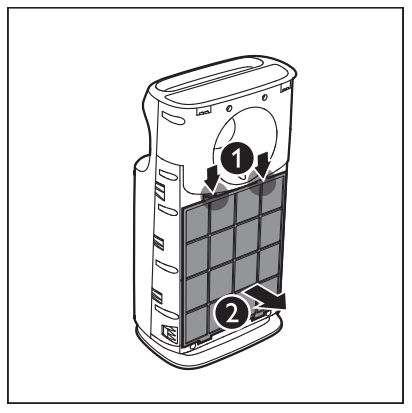
Press the two clips down and pull the pre-filter towards you (see image below)
Wash the pre-filter under a running tap. If the pre-filter is very dirty, use a soft brush to brush away the dust
Air dry the pre-filter until it is completely dry.
The pre-filter may be clogged (a cylindrical filter)
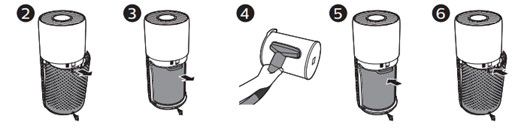
To clean the cylindrical filter, you can follow the steps below:
1. Switch off the appliance and unplug it from the wall outlet.
2. Pull the back cover and remove it from the appliance.
3. Clean the surface of the filter with a vacuum cleaner.
4. Put the filter back into the appliance.
5. Reattach the back cover.
1. Switch off the appliance and unplug it from the wall outlet.
2. Pull the back cover and remove it from the appliance.
3. Clean the surface of the filter with a vacuum cleaner.
4. Put the filter back into the appliance.
5. Reattach the back cover.
The filter package is not removed
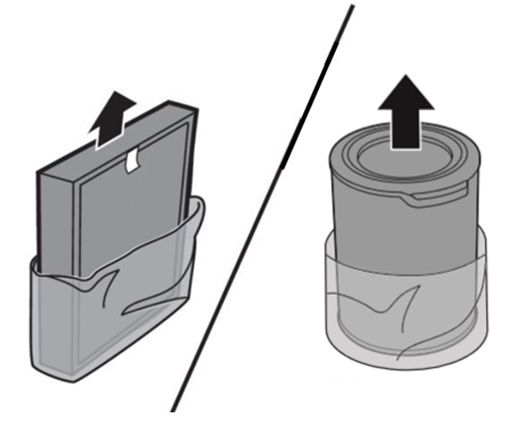
When the wrapping plastic is not removed from a filter, this might cause an unusual noise. Please, make sure there is no plastic wrap left covering the filters.
Something is blocking air inlet or outlet
The air inlet or outlet may be blocked by external objects. Please check and make sure the air inlet and outlet are unobstructed.
Your air purifier may be malfunctioning
If none of the above situations apply, then there might be a technical issue with your purifier. In this case, please contact us.